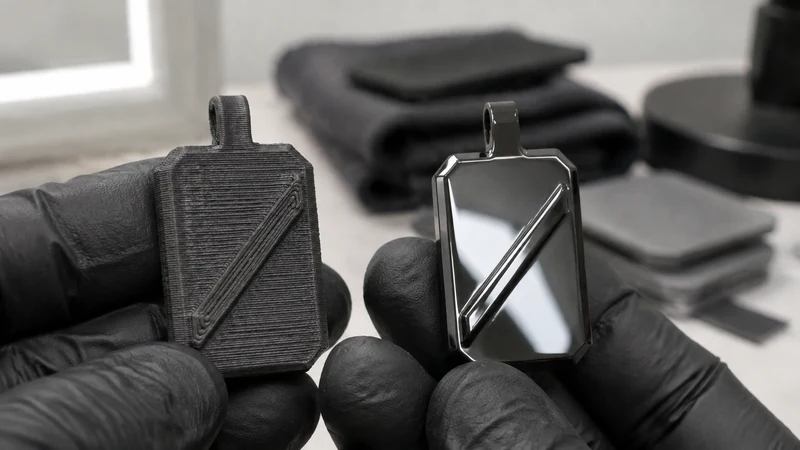
What buyers notice first
A buyer rarely inspects a part like an engineer. They look at it from arm’s length, pick it up and turn it in the light. Three things tend to give a print away.
- Layer texture: the fine ridges that run across every face, easiest to see on flat and gently curved surfaces.
- Edges: wavy, rough or uneven edges read as unfinished before the surface does, while crisp edges read as deliberate.
- Uneven sheen: patches that catch the light differently, glossy in one spot and dull in the next, look like a mistake even when every spot is smooth.
Spotting these faults is a skill of its own. For what each one looks like under side light, see How to Read 3D Print Surface Defects.
A finish-or-not checklist
Finishing costs time on every single piece, so ask these questions before you commit:
- Viewing distance: will the buyer see it across a table, in a hand, or from a few inches away? The closer the look, the more the surface matters.
- Handling: will it be picked up and turned over? Fingers find texture that eyes miss.
- Photos: will your listing photos show close-ups or light from the side? Raking light shows layer lines in photos as well.
- Time per piece: how long does one piece take, finishing and cleanup included, and what else could you make in those hours?
- Purpose: is it a display piece or a gift, where look and feel are the point, or a working part where function comes first?
- Detail: fine detail can soften under sanding, so decide whether the piece has detail worth protecting.
If a piece passes most of these, the next step is the sanding itself, covered in How to Sand 3D Prints.
Where finishing earns its time, and where it does not
Finishing makes the most sense on display pieces, gifts, pendants, desk objects and anything a buyer will hold and study closely. There the surface is part of what is being bought.
It makes less sense on hidden or functional parts, on prototypes, and on bulk items where the extra time per piece cannot be spread out. Leaving a part as printed is a legitimate decision, and a good one for a part nobody will inspect.
Choosing between a soft satin look and high gloss is its own decision, covered in Matte vs Glossy Finish for 3D Printed Products.
For the surface cues that make a part look manufactured rather than printed, see How to Make 3D Prints Look Injection Molded.
Check the model’s license first
Before the surface, check the rights. Whether you may sell prints of a model depends on the license of that model, set by whoever designed it. Some models are for personal use only, some allow sales with credit, and some forbid commercial use outright. Read the license for every model you plan to sell and keep a note of it. Finishing a print does not change who owns the design.
This is general information, not legal advice.
Describe the piece as it is
Say what the piece is made of, that it was printed and finished by hand, and let your photos show the surface honestly. Finishing improves how a part looks and feels. It does not turn a weak design into a strong one, and there is no reason to hide that a piece is 3D printed.
Bottom line
Finish the pieces a buyer will hold and look at closely, leave the rest as printed, and check the license before either. Decide piece by piece, and judge the surface the way a buyer will: in the hand and under light from the side.
If you want models that are made to be sanded and polished, with a commercial license to sell the prints, PolishMaster LAB is a separate membership of support-free pendant and keychain models as STL and 3MF, $12 a month or $119 a year through Gumroad. While you are a member, the license lets you sell the prints; sharing or reselling the files is not allowed. It works without THE FORMULA, and Gumroad handles billing and refunds.